
Its very simple to install git on any platform -
Linux
Install git on Ubuntu, or RHEL based distros
sudo apt-get install git    # ubuntu based distro

sudo dnf install git    # fedora

sudo yum install git   # centos or rhel
Mac
If you have homebrew installed -
brew install git
Windows
For windows, we have git-scm
Download and install it HERE
Configure your username and email in git config
This is used when we try to synchronize the files between local and remote. Also all the commits have information about the person who committed.
git config --global user.name "Mridul Ganga"
git config --global user.email "[email protected]"
After this we are ready to use git to do any kind of operation.
Create a new repository locally
To make a repo, we first need to create a folder ex - project1
mkdir project1
cd project1
Now that we are inside the project folder, we can initialize a git repo here.
git init
That's all we need to do to create a local repo. One thing to note is - currently this repo is not linked to any remote. Whatever changes we do - commits, branches etc will always remain on the machine and will not be synchronized with any remote repo.
Create a new repo on github (remote repo)
Login to github and find the + button on the top right corner. Then select New repository
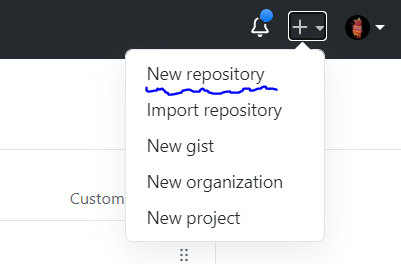
Follow the steps on the screen - give a name, some description and continue. This will create a new repo on github (remote repo).
Clone remote repo to a local repo
Git provides a simple command to copy the remote repo to a local repo. We use the clone command for this
git clone https://github.com/mridulganga/mg-bot
cd mg-bot
Now we have a local repo which is connected to a remote, let's make changes and push those changes to the remote repo.
Basic steps to make code changes
create a github repo
Use the steps above to create a github repo
clone the github repo
use the git clone command to clone the repo
git clone https://github.com/mridulganga/repo-name
cd repo-name
Make the code changes
# we are creating a readme file with Hello world in it
echo "Hello World" > Readme.md
Find all the files changed & check the diff
git status

git diff
Stage the files to be commited
git add .   # or git add Readme.md

git status   # see status again to see staged files in green
Commit the staged changes with a message
git commit -m "adding a readme file"
Now the changes are commit to the local repo, we need to sync there changes to the remote
Push changes to remote repo (master branch)
git push origin master
After this, goto github and you should be able to see the Readme.md file in the repo page.
Get remote changes to local repo
Let's assume there are multiple people working on the code. Someone made some changes and pushed the code to remote. Now we want those changes in our local repo. For this we use the git pull command.
git pull origin master
# or
git pull
How do open source projects use git
The above workflow can be used for personal projects or projects with few contributors. In case of open source or big projects there are usually many people working on the same repository. They make use of github issues to decide who will work on what. And the respective developers make the changes in their own feature branches. When their changes are done, they create a Pull Request. The code changes in pull request are reviewed by one or more reviewers and they give their approvals or request changes. The developer can then make changes based on review comments and keep pushing to the same branch. When the PR is in a good state, it gets merged by one of the repo maintainers. This is how the code changes land in the master branch.
Lets try the above steps
Taking example of a repo https://github.com/mridulganga/mg-bot, we want to add some changes in Readme file.
clone the repo locally
git clone https://github.com/mridulganga/mg-bot
make a new branch for readme changes
git checkout -b readme-changes
make the code changes
nano README.md
# add some changes in the file
I made the following change (image below)
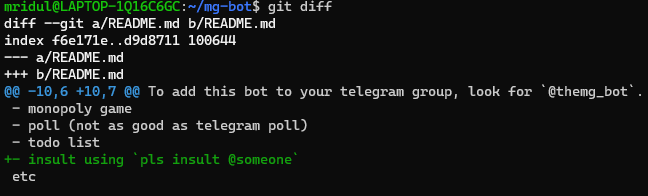
Stage, commit and push the changes to the remote
git add README.md
git commit -m"adding insult command info"
git push origin readme-changes
Open the repo on github
when we open it on github.com we now see the following option to create a pull request from the new branch we pushed to -

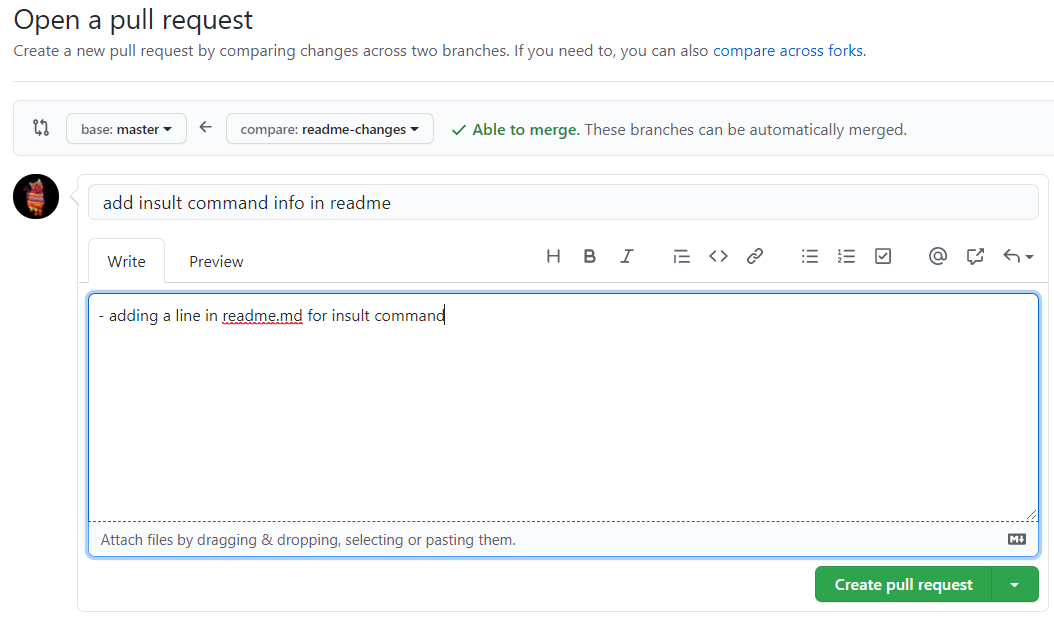
Create the pull request
You get the following page on github to create a new pull request. Give it some name and description and create the request.
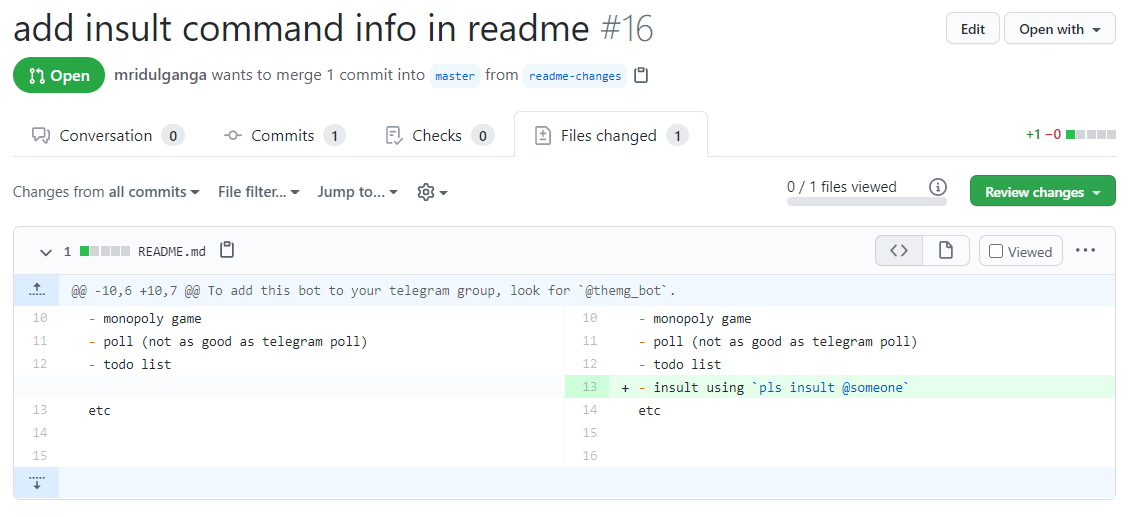
Code reviews
Whenever we make a pull request, other people working on the code can come and review the code changes. They can put comments and suggestions on the code and then give their approvals. Below is how a typical code review page looks like
Merging a PR
When the code reviews are done and your PR has enough approvals (usually 2) then it can be merged by a maintainer. They see something like below -
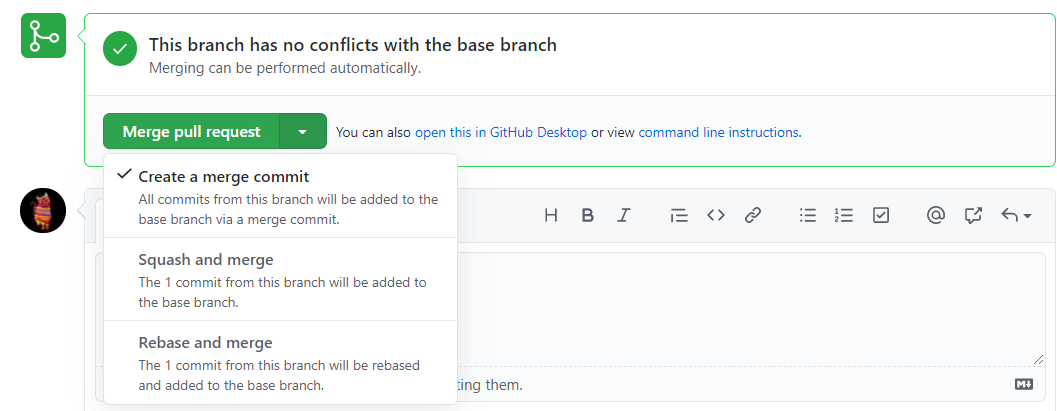 We usually get options like squash, rebase and merge commit.
- Squash will combine all commits of PR into one commit. use this
- Rebase will place the commits on top of master.
- merge commit will create a new merge commit in master on top of other commits.
The above is the workflow you can take up when you are a collaborator in any project on github. In case you want to make contributions to repo which you do not own -
- Fork the repo into your account
- Clone the fork locally
- make a branch
- make code changes
- stage, commit, push to the branch
- create a new Pull Request from your forked repo's branch to the original repo's master branch
- await reviews and get the PR merged
About the author
I am a full stack developer mainly using golang. I work on Cloud at HPE, Bangalore, India.
Comments
Join the discussionI don't understand why people still using command line to use git. Using a Git GUI client, isn't more easy?
A lot of people including me prefer CLI over GUI.
Make you feel like a hacker.
Good one for beginners MG !!!
How to git
This series will teach basics of git and how to start contributing to projects by making pull requests etc. git is a version management tool which helps us store code in repos.


