
Both git merge and git rebase are used to integrate the changes from one branch into the other branch. We usually create a feature branch - make the code changes in form of commits and then either merge or rebase it into master. See the below image which demonstrates merge and rebase.
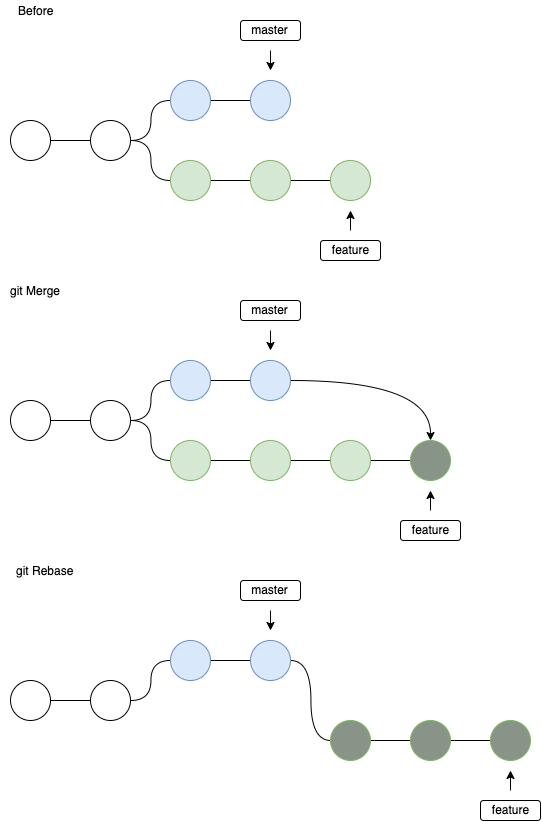
Merge
In case of merge, we take all the changes of the feature branch and make one merge commit on the master branch. This is a non-destructive operation. The feature branch is not affected in any way. In case of merge - we lose the history of commits of the feature branch. But we get a much cleaner looking master branch.
git checkout feature
git merge master

# or
git merge feature master
Rebase
In case of rebase, we move all the commits of the feature branch to the top of master branch. This way we copy all commits as is. We get the entire history of the changes in the feature branch in the master branch.
git checkout feature
git rebase master
Problems with rebase
- when we get any conflicts while rebasing, git will apply the commits one after the other, instead of showing all conflicts at once. So, if we have more number of conflicts- the rebase can be painful.
- people might rebase master over feature branch, which corrupts the history. Specially the people who make use of
git push --forcethis can rewrite the history in git and cause lot of trouble. - the master branch will get all the commits of feature branches, which can sometime make the history of master too big.
git log
Git log command is used to see the commit history of the currently checked out branch.
git log
We could also apply some nice filters
git log --author <name>
git log --before <date>   # --after is also supported
git log --oneline   # one line per commit
git checkout
git checkout can be used to do multiple things.
# Create a new branch using
git checkout -b <branch>

# checkout to existing branch
git checkout feature
If you have made some changes to a file, but you want to get the original file
git checkout filename

# checkout to a commit
git checkout <commit_id>
git stash
When you have made some half-baked changes and you want to switch branches - you can save your changes in a stash and switch branches. When you are done, you can switch back and pop the stash.
# save changes to stash
git stash

# load changes from stash
git stash pop
It is possible to have multiple stashes
# list stashes
git stash list

# apply a specific stash
git stash apply stash@{2}

# create branch from stash
git stash branch testbranch
git reset
When you want to undo some commits/move the git HEAD to a previous commit, we make use of git reset. There are three types of reset - soft, mixed, hard
hard
This is the most direct, DANGEROUS, and frequently used option. When passed --hard The Commit History ref pointers are updated to the specified commit. Then, the Staging Index and Working Directory are reset to match that of the specified commit. Any previously pending changes to the Staging Index and the Working Directory gets reset to match the state of the Commit Tree. This means any pending work that was hanging out in the Staging Index and Working Directory will be lost.
git reset --hard <commit_id>
mixed
This is the default operating mode. The ref pointers are updated. The Staging Index is reset to the state of the specified commit. Any changes that have been undone from the Staging Index are moved to the Working Directory.
git reset --mixed <commit_id>
soft
When the --soft argument is passed, the ref pointers are updated and the reset stops there. The Staging Index and the Working Directory are left untouched.
git reset --soft<commit_id>
git revert
If you want to undo a specific commit from the history, we can make use of git revert. This creates a new commit on the HEAD which undoes the changes of the specified commit id.
git revert <commit_id>
git cherry-pick
git cherry-pick is a powerful command that enables arbitrary Git commits to be picked by reference and appended to the current working HEAD.
git cherry-pick <commit_id>
git commit --amend
If you want to modify the last commit, use --amend. This will edit the last commit, in case you want to add more changes to it.
git commit --amend
git clean
If you made some changes which you don't need anymore. You never commited or even staged it, we can use git clean to remove the changes.
git clean
About the author
I am a full stack developer mainly using golang. I work on Cloud at HPE, Bangalore, India.
Comments
Join the discussionNo comments yet. Be the first to comment.
How to git
This series will teach basics of git and how to start contributing to projects by making pull requests etc. git is a version management tool which helps us store code in repos.


